 Download
What is Ask AI in Noted?
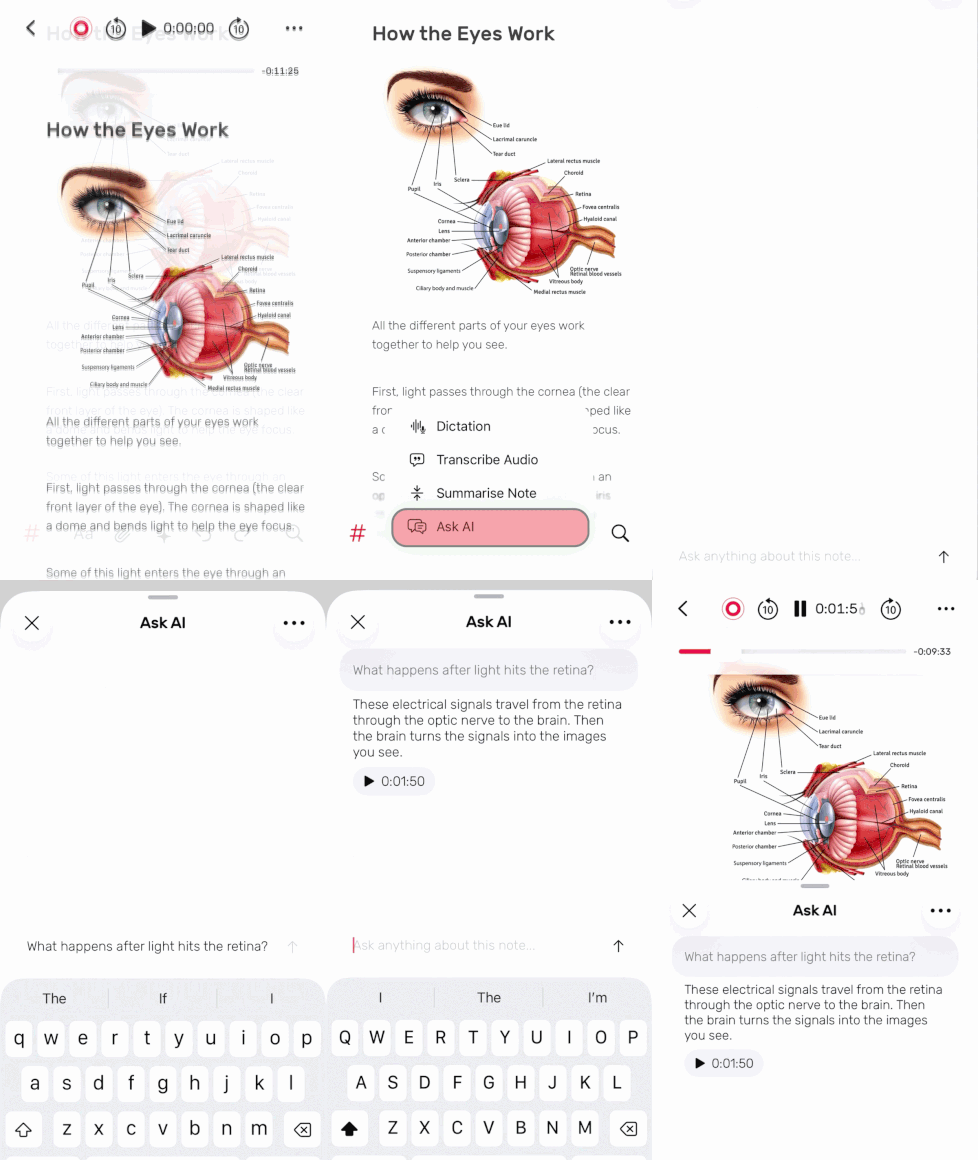
Ask AI is a tool that lets you chat with your recordings and notes. Simply ask a question in natural language, and Noted finds the relevant answer from your recordings and takes you directly to that moment in the audio. No keywords, timestamps or manual searching required.
Do I need to transcribe my recordings first?
No. Ask AI works without transcription, tags, folders or manual organisation. Just ask a question.
Does Ask AI work with newly recorded and older recordings?
Yes. Ask AI works across all recordings stored in Noted, whether they were created today or months ago.
How is Noted different from other note taking apps?
Most note taking apps focus on capturing information. Noted is designed to help you find information later. With Ask AI, you can ask questions about your recordings and instantly jump to the moments that matter, making your notes more valuable over time.
How does it work?
1. Open any recording in Noted and tap the ✨ icon
2. Select Ask AI and enter your question.
3. Review the answer and tap the timestamp to jump to that moment in the audio.
Do I need an internet connection to use Ask AI?
Yes. Ask AI requires an internet connection to process your questions.
Is my data private when using Ask AI?
Ask AI follows Apple’s privacy and security standards for Apple Intelligence features. Your recordings are not shared or stored externally.
What types of questions can I ask Ask AI?
Ask AI understands natural language, so you can ask questions the same way you would ask a colleague. You can ask Ask AI anything about your recordings, such as:
“When did we talk about the marketing plan?”
“What deadlines did we discuss?”
“What was the final decision on pricing?”
“What action items were assigned to me?”
What happens if Ask AI can’t find an answer?
If Ask AI can’t find relevant information in your recordings, it will let you know. Try rephrasing your question or providing more context to help narrow the search.
Why can’t I see Ask AI in Noted?
Ask AI requires:
- The latest version of Noted
- A supported iPhone, iPad or Mac
- Apple Intelligence enabled on your device
If you meet these requirements and still don’t see Ask AI, make sure your device software is up to date.